The camp moments parents love, protected like children's media should be

A real camp gallery, not a shared drive full of children's faces

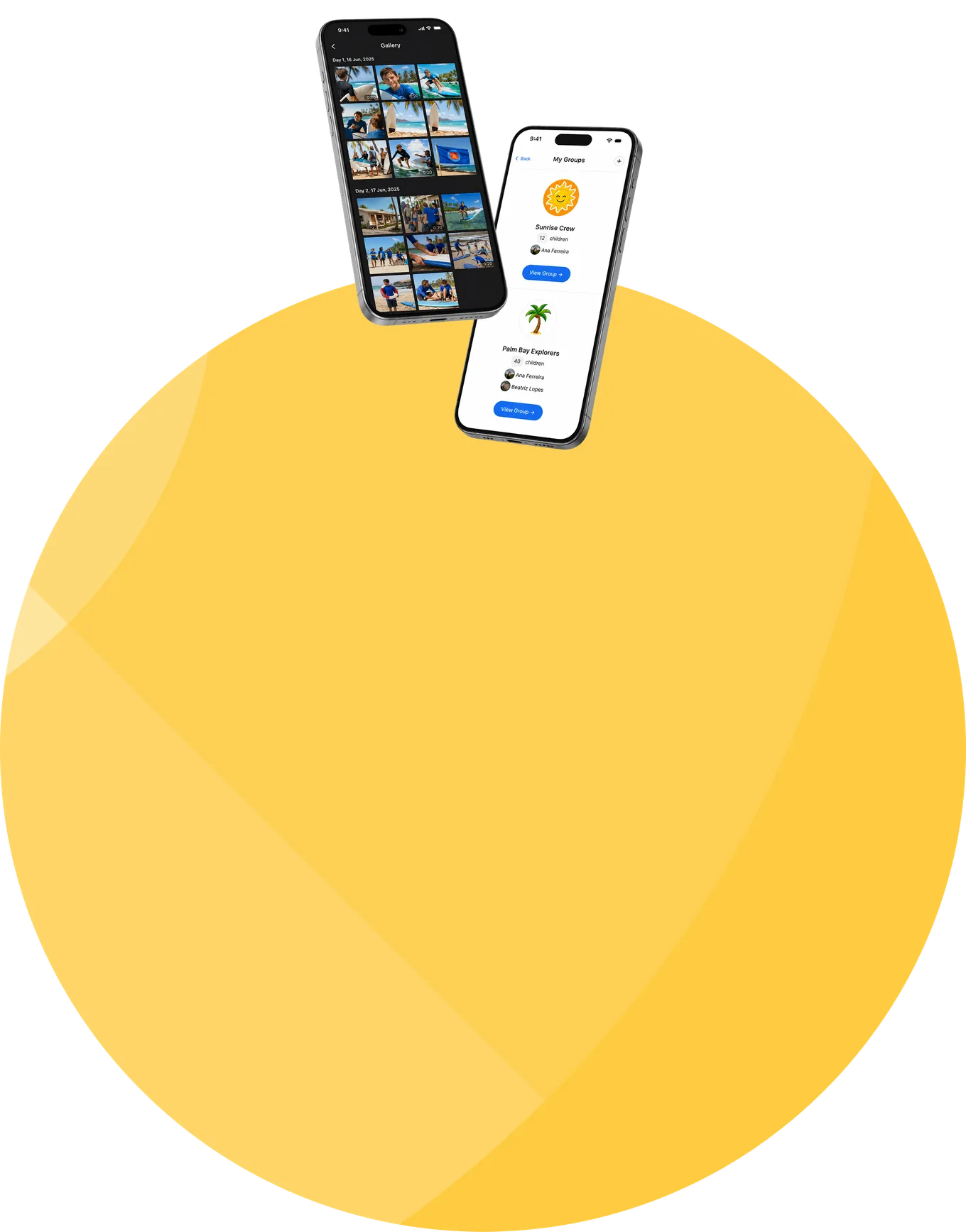
Sharing media through group chats, public albums, and cloud folders feels convenient, until the difficult questions begin. Who can see the children in these photographs? Who is allowed to upload? How is inappropriate content caught? Who made the last moderation decision, and where is that written down? And how does a parent find today's activities in a folder of three thousand unsorted files? CampOrganizer replaces that with a gallery built around the session, its families, and the responsibilities that come with children's media. Each session has its own photo and video gallery. Staff add the media; the session's parents, participants, and authorized staff view it. Photos are converted into fast-loading previews with the originals preserved; videos become adaptive streams that start quickly on web and mobile; and everything is grouped by day, so families follow the program as it happened. Every upload is screened automatically for potentially explicit content. Anything that crosses the threshold is hidden and queued for review; viewers can report media too, and enough independent reports hide an item pending review. A human administrator or curator makes the final call, nothing is silently deleted by an algorithm, and every moderation action is recorded. A camp gallery is a collection of children's faces, activities, relationships, and locations. It should be treated like one.

Everything families value, on infrastructure built for children's media

  • A gallery for every session Photos and videos stay connected to the program they came from, not mixed across seasons and unrelated groups, and not duplicated into email threads, chat groups, and cloud folders. Staff upload once; everyone who should see it, sees it.
  • Organized by day Families follow the week in sequence, Tuesday's hike next to Tuesday's dinner, instead of scrolling one endless, unsorted stream.
  • Staff-controlled uploads Session and camp staff publish; parents and participants view. Responsibility for what enters the gallery stays with the organization.
  • Viewing in Family and Explorer Parents browse in the same Family experience they use for onboarding, schedule, and updates; participants revisit their session's memories in Explorer. No extra account, no social-media profile, no forwarded album link.
  • Fast photos, originals preserved Uploads are processed into web-optimized previews for quick browsing, while the full-resolution original is retained. The gallery stays fast without throwing away source quality.
  • 4K in, smooth streaming out Upload big source footage, 4K included, and the platform transcodes it into an adaptive stream with a poster image, visible only once processing completes. No manual compression, no broken players, no waiting for a full download before playback starts.
  • Download a moment, or the whole day Authorized viewers save individual photos and videos, or download a full day as one archive, without staff sending files around separately.
  • A safety net with a human in the loop Every upload is screened automatically, viewers can report anything, uncertain items are hidden, and a human makes the final decision, with every action recorded.

Staff publish. The platform checks. Families view. Humans decide.

Staff choose what enters

The workflow starts with staff. Parents and participants don't publish into the controlled gallery, which keeps responsibility for shared content where it belongs.


Checked before anyone sees it

Media is processed for reliable delivery and screened for potentially explicit content before it appears. Families see ready, checked media, never half-processed uploads or something published on an algorithm's guess.

Viewers are the second signal

Parents, participants, and staff can report an item. Enough independent reports hide it pending review, a human safety net on top of the automated one.

A human makes the call, nothing is auto-deleted

Screening and reports can hide and queue; only an administrator or curator approves or removes. A false positive costs a temporary review. A silent auto-deletion could cost a legitimate memory, so the platform doesn't do it.

Every decision is on the record

Moderation actions are written to an append-only history: what was flagged, what was decided, and by whom, not an unexplained disappearance from a shared folder.
From a counselor's phone to a protected family gallery

1

Staff upload into the session's gallery

A staff member picks the day's photos and videos and uploads them straight into the right session.

2

The platform prepares them

Files land in private storage; photos get optimized previews with originals kept, videos get a poster and an adaptive stream, 4K source footage included.

3

Every item is screened

The content check runs on everything. Anything potentially explicit is hidden and queued before a family could see it.

4

Ready media appears by day

Once processing and checks are done, media shows up in the day-grouped gallery.

5

Families browse and download

Parents and participants open the gallery in Family and Explorer, and save a single moment or a whole day.

6

Reports go to a human

A concern hides the item after enough independent reports; an administrator or curator reviews, decides, and leaves a recorded moderation decision.

The right relationship with children's media for each person

Parents and guardians

See the moments, feel connected across the distance, download the memories worth keeping, and report anything that looks wrong.

Participants

Revisit the activities, friendships, and achievements of their own session in Explorer.

Counselors and session staff

Upload the day's media from the program context instead of messaging photos to families one by one, and see when something they uploaded was flagged.
Administrators and curators

Review the moderation queue, approve or remove, control access, with a complete audit trail behind every decision.

Directors and safeguarding leads

Give families a genuine window into the program while holding a defensible model for access, screening, human oversight, and accountability.


Media scoped by the same platform that runs the program

From sessions

every gallery belongs to a defined session, its Teams, and its activities.

From registration

viewers are known identities with established family relationships, a parent sees their own child's session, not a forwardable URL.

From staff management

publishers are the session's staff; moderation sits with explicitly designated administrators and curators.

Into Family and Explorer

the gallery lives beside onboarding, schedule, Feed, and contacts, one more reason families never leave the app.

Alongside parent communication

a photo of the day answers the question a parent would otherwise have asked a counselor.

Into the security record

flags, reports, approvals, and removals stay part of the platform's accountable history.

A gallery of children, protected like one

  • Private, session-scoped, staff-published Media lives in private storage and is delivered through authenticated platform access, no open album URL. The gallery belongs to one session, visible to its authorized families, participants, and staff; only staff publish into it.
  • Hidden when uncertain Every upload is screened before family visibility, and the system errs toward hiding: a false positive causes a short review, while a missed explicit image could reach children and families. That trade-off is deliberate.
  • Humans decide, on the record Automation hides and queues, it never permanently deletes. Administrators and curators make the approval and removal decisions, and every action lands in an append-only audit history.
  • Screening does not replace safeguarding No automated classifier is perfect, and CampOrganizer doesn't pretend otherwise. Screening, reporting, and review reduce risk; media-consent rules, staff training, and child-protection policies remain the organization's job.
  • Personal accounts stay personal No children's media on a counselor's WhatsApp, private drive, or social profile, the gallery keeps operational media inside the organization's environment.
  • Encrypted and certified security management Data is encrypted in transit and at rest using industry-standard controls. CampOrganizer's information security management system is certified according to ISO/IEC 27001:2022 by an independent certification body, covering standard and white-label deployments. The certificate and certified scope are published on the Trust page.

The update families love, without the risk of a shared album

Parents see their child is doing well

A photograph from today's activities answers the quiet question, is everything okay?, better than any status update, and closes the distance without interrupting staff.

Staff upload once, even the big files

One session gallery replaces repeated photo messages and duplicate uploads, and 4K footage goes in as-is; the platform does the preparing.

It is not a public album of children

Access follows known users and their session relationship, not possession of a link that can be forwarded forever. Publication belongs to the organization, not to whoever created a shared folder first.
Big galleries stay enjoyable

Day grouping, optimized previews, and smooth streaming keep a growing collection browsable, and downloads let families keep the moments that matter.

An answer for the parent who asks

"Who can see my child's photos, and what happens if something is wrong?", private storage, session access, automatic screening, viewer reporting, human review, and an audit trail. A concrete answer, not a shrug.

The memories stay with the program

When the chat thread dies and the drive link rots, the gallery is still there, connected to the session it came from.
Frequently asked questions about the CampOrganizer gallery

Does every session get its own photo and video gallery?
Yes. Each session has its own gallery, so seasons, groups, and family audiences never mix.
Who can upload, and who can see it?
Session and camp staff upload; the session's authorized parents, participants, and staff view. Families get viewing and download access, not publishing access.
Is the gallery public?
No. Media sits in private storage and is delivered through authenticated, session-scoped access, parents view in Family, participants in Explorer. There is no open album URL to forward.
How is the gallery organized?
By day. Families follow the session in sequence, with fast-loading previews, while the full-resolution originals are preserved.
Does it handle video, even 4K?
Yes. Upload 4K source footage and the platform transcodes it into an adaptive stream with a poster image, ready for smooth playback on web and mobile, no manual compression, and no downloading the whole file before it plays.
Can families download photos and videos?
Yes, individual items, or a whole day as one archive.
How does automatic moderation work, does it delete things?
Every upload is scored for potentially explicit content; anything over the threshold is hidden from families and queued. Nothing is deleted by the algorithm, a human administrator or curator makes the final approval or removal decision, and it's recorded.
Can families report content, and who decides?
Yes. Any authorized viewer can report an item; after enough independent reports it's hidden pending review (a single report doesn't remove content for everyone). Administrators and designated curators review and decide, counselors see the status of what they uploaded, but final calls on flagged content stay with moderation roles. Every decision lands in an append-only audit trail.
Is automated screening completely accurate?
No automated classifier can guarantee that, and we won't claim it. CampOrganizer combines screening with viewer reporting, conservative hiding, and human review rather than trusting the algorithm alone.
How is this safer than a WhatsApp group or a shared cloud album?
Private storage, session-scoped access, staff-only uploads, automatic screening, viewer reporting, human moderation, and an accountable decision history, none of which a group chat or a forwarded album link provides. Staff never need personal accounts for children's media, and CampOrganizer's information security management system is certified according to ISO/IEC 27001:2022.

Share the experience without sharing it with the world

In a 30-minute demo, we'll show each session's private gallery end to end, staff upload (4K included), day-by-day browsing, downloads, automatic screening, viewer reporting, and accountable human moderation.

© 2026 CampOrganizer. All rights reserved.